Project 02 · of 11
Wireless network measurements
Carried out in first year at the IUT de Colmar (UHA), this “Wireless network measurements” project aimed to get hands-on with Wi-Fi technologies and to characterise a transmission system through measurement. The work was split into three parts, from physical cabling to the analysis of radio coverage.
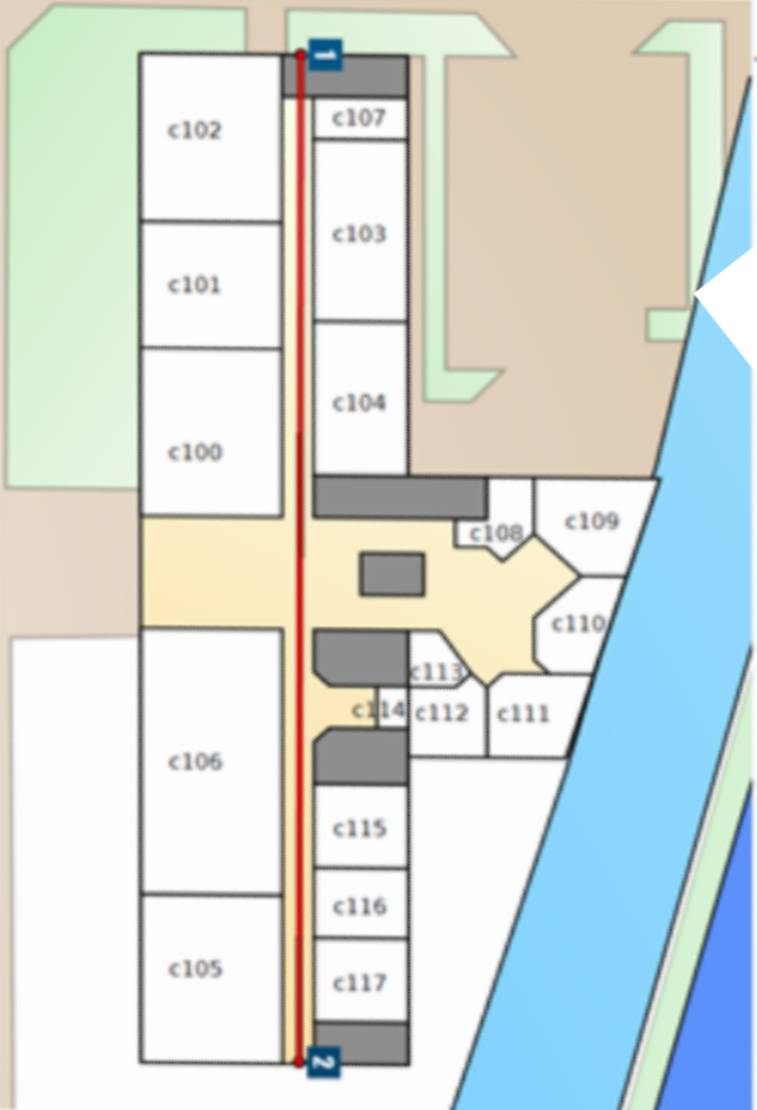
Installation — we cabled the racks of rooms C100, C101 and C102 with 4-pair S/FTP Cat.7 cable (and flexible F/FTP Cat.6A), fitted the patch panels and RJ45 connectors, then deployed Cisco equipment: an access point, a PoE switch and a Wi-Fi controller. The links were validated with a CableMaster 200 tester, and PoE measurements were taken on the Cisco WS-C2960-24PC switch (49 V, 13 W received, IEEE 802.3af / Type 1 standard).
Simulation — we modelled this architecture in Cisco Packet Tracer, with a Wireless Controller, an Access Point, a PC and a Wi-Fi laptop, plus a server room: SSID configuration, WPA2-PSK security, DHCP on the controller and a DNS server (A record pointing to uha11.fr).
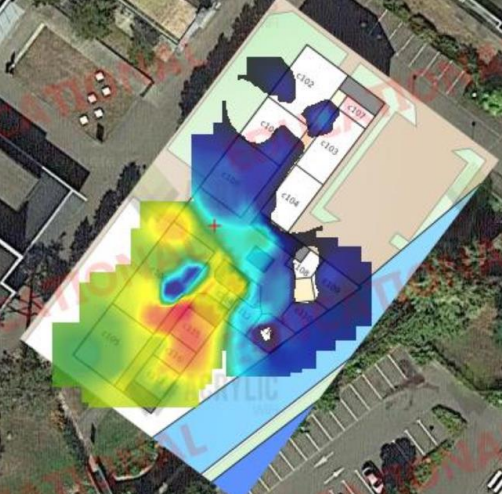
Measurements & heatmap — using Acrylic Wi-Fi Analyzer, we measured the received power according to distance and obstacles (plasterboard, glass, concrete slab), compared the 802.11g (2.4 GHz) and 802.11a (5 GHz) standards, tested download speeds room by room, then produced coverage heatmaps of building C. The access points broadcast on the non-overlapping channels 1, 6 and 11 to limit co-channel interference.
Characterise a wireless transmission system through measurement: install and cable a Cisco Wi-Fi network, simulate it in Packet Tracer, then measure and map its coverage and performance (power, throughput, attenuation) to analyse its quality.
- Cabling the racks (S/FTP Cat.7, F/FTP Cat.6A), patch panels, Cat.6A RJ45 connectors, continuity tests with the CableMaster 200.
- Deploying the Cisco equipment: access point, PoE switch and Wi-Fi controller linked between the racks.
- Measuring PoE on the WS-C2960-24PC switch: 49 V, 13 W received, identification of the 802.3af standard (Type 1).
- Power measurements with Acrylic Wi-Fi every 5 m, on the 802.11g and 802.11a networks.
- Assessing signal loss through different obstacles (plasterboard, single glazing, concrete slab).
- Download speed tests room by room to compare 2.4 GHz and 5 GHz.
- Simulating the architecture in Packet Tracer (controller, AP, SSID, WPA2-PSK, DHCP, DNS uha11.fr).
- Producing the heatmaps (ground floor, 1st floor, combined with 3 APs) and analysing the Acrylic indicators (RSSI coverage, channel overlap, overall quality).
- Writing the report and slides, and preparing the group presentation.
- Getting to grips with Acrylic Wi-Fi, which took some time to fully understand its features.
- Configuring the network equipment, sometimes tricky, which required digging into the technical documentation.
- Interpreting the results: reading the heatmaps and analysing the speed tests.
- A striking technical finding: 802.11a (5 GHz) offers higher throughput but a very short range (no signal in C102 at ~15 m), whereas 802.11g (2.4 GHz) reaches further and goes through obstacles better.
- AC12.01 — Measure, analyse and comment on signals.
- AC12.02 — Deploy transmission media.
- AC12.03 — Communicate with a third party (client, colleague…) and adapt one's message to the audience.
Getting even coverage across the whole building: some areas were poorly served. Measurements with Acrylic Wi-Fi Analyzer and the heatmap made it possible to pinpoint the weak spots and back them up with data.
Producing a coverage heatmap to visualise signal quality instead of relying on gut feeling, and to support decisions on where to place the access points.
Standards-compliant cabling (S/FTP), connection quality tests, and documented measurements so they could be presented.
- Report “Analysis and optimisation of a wireless network” (16 pages, Dec. 2024).
- Presentation slides and group oral defence + individual multiple-choice test.
- Cisco Packet Tracer simulation file.
- Wi-Fi coverage heatmaps of building C.
Interactive lab · my Wi-Fi measurements
The real measurements from our report: move the distance, add an obstacle and compare 2.4 GHz with 5 GHz.
The interactive demo needs JavaScript. All the measurements are in the PDF report below.
Previews
Documents & files